Updated for the latest Raspberry Pi OS (Trixie, Debian 13). The code, the install script and the steps below now work on current Raspberry Pi OS; the original 2021 version needed Buster.

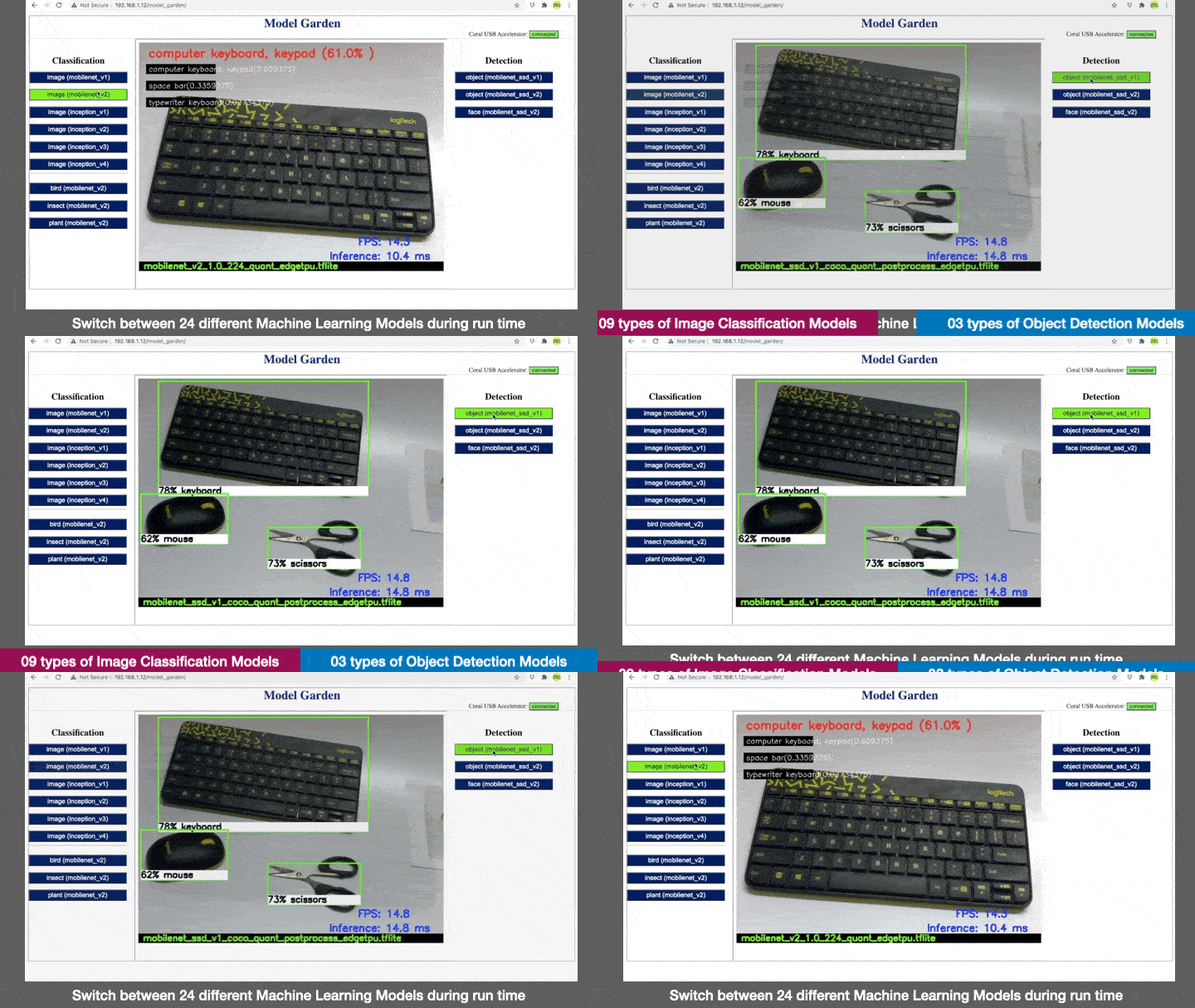
Model Garden is an educational tool for understanding how machine learning models behave. It runs a model on a live camera feed on a Raspberry Pi, and a web page lets you switch to a different model while it runs, so you can see straight away how the models’ answers, confidence and speed differ, with and without a Coral USB Accelerator. This project received ‘TensorFlow Community Spotlight‘ winner award for the month Jun 2021.
I am thankful for this Tweet by TensorFlow and gifting these TensorFlow souvenirs.

About the Project
 .
.
Google has provided a variety of pre-trained Machine Learning Models under the computer vision category. These models are known as Inception and Mobilenets. Multiple versions of these models have been released in the recent past. Inception is a Deep Convolutional Neural Network (CNN) that is primarily used for classifying images. MobileNets are also CNNs and optimised to run efficiently on edge devices such as Coral dev boards, Mobile Phones, Raspberry Pi. These are small sized models with low-latency and high accuracy.
A complete list of the pre-trained models provided by the Google coral team can be accessed here. Some of the computer vision models have been bundled together as canned models and can be downloaded as a package through this link.
https://dl.google.com/coral/canned_models/all_models.tar.gz.
Canned models comprise of following model and label files:-
|
Type |
Model file |
Label file |
Description |
|
Image Classification |
inception_v1_224_quant_edgetpu.tflite |
imagenet_labels.txt |
These models can classify upto 1000 different types of objects as mentioned in the label file. This label file is common for all these models.
For a given input image, the accuracy and latency is different for each of these models.
|
|
inception_v2_224_quant_edgetpu.tflite |
|||
|
inception_v3_299_quant_edgetpu.tflite |
|||
|
inception_v4_299_quant_edgetpu.tflite |
|||
|
mobilenet_v1_1.0_224_quant_edgetpu.tflite |
|||
|
mobilenet_v2_1.0_224_quant_edgetpu.tflite |
|||
|
mobilenet_v2_1.0_224_inat_bird_quant_edgetpu.tflite |
inat_bird_labels.txt |
This model can classify 900+ birds |
|
|
mobilenet_v2_1.0_224_inat_insect_quant_edgetpu.tflite |
inat_insect_labels.txt |
This model can classify 1000+ insects |
|
|
mobilenet_v2_1.0_224_inat_plant_quant_edgetpu.tflite |
inat_plant_labels.txt |
This model can classify 2100+ plants |
|
|
Object Detection |
mobilenet_ssd_v1_coco_quant_postprocess_edgetpu.tflite |
coco_labels.txt |
These models can locate upto 90 different type of objects in a picture frame |
|
mobilenet_ssd_v2_coco_quant_postprocess_edgetpu.tflite |
|||
|
mobilenet_ssd_v2_face_quant_postprocess_edgetpu.tflite |
coco_labels.txt |
This model can locate human faces in a picture frame |
Each of the above model files also have a version which is compiled to run on edgetpu (Coral USB Accelerator) and is present in canned models.
You can run these models on Raspberry Pi using example scripts provided by the coral team. However, prior to running examples, you need to install Tensorflow Lite interpreter and Coral Accelerator libraries on your Raspberry Pi.
While working with various examples, I found myself juggling with different scripts when i was trying to switch between classification and detection models as they have different processing logics. I wanted to switch them during run time using a single script. So, it occurred to me that it would be nice if i could combine the following capabilities into a single master script:-
- Flexibility of choosing different input devices such as Picamera or USB camera.
- Switch between 24 different models during runtime without stopping / restarting a script.
- Based on a model loaded in CPU / edgetpu, the script should dynamically process the input image through classification or detection logic.
- Attach / detach the Coral Accelerator during run time.
- The output of inference should be overlaid on the image and streamed over LAN. So that it could be viewed on a browser.
The project folder contains a python script “model_garden.py” which does all the tasks mentioned above. The folder also contains the code for a simple web interface that displays the streaming output of the python script along with buttons to send commands to the script to load a different model during run time.
This tool can be useful for quick demonstration of all the canned models and can be easily scaled up to accommodate more models.
Configure your Raspberry Pi to Run this project
In order to make things simpler for beginners, I created a bash script which configures a Raspberry Pi in all respects to run this project. It works on the latest Raspberry Pi OS (Bookworm or Trixie). Run these two commands on your Raspberry Pi:
curl -fsSL https://raw.githubusercontent.com/jiteshsaini/model_garden/main/setup_model_garden.sh -o setup_model_garden.shsudo bash setup_model_garden.shDownloading the script first, rather than piping it straight into sudo, lets you read it before running it. It updates the OS and downloads 185 MB of models, so it can take a while. If it ends with a REBOOT NEEDED box, reboot the Raspberry Pi before going further.
The bash script performs following actions on your Raspberry Pi automatically:-
- Update the Raspberry Pi OS
- Install Apache Webserver and PHP
- Install LiteRT, the successor to the TensorFlow Lite runtime, and a Coral USB Accelerator library built to work with it
- Install OpenCV and the Raspberry Pi camera library (picamera2)
- Download pre-trained Models from google coral repository
- Install the model_garden source code in /var/www/html/model_garden and set permissions
- Let the web server use the camera and the Coral Accelerator, so the project can be started from the web page
- Check that everything works, and print the address to open
A Raspberry Pi 3A+ cannot supply the current a Coral Accelerator draws under load, and may reset during the larger models. Power the Accelerator through a powered USB hub or a power-injector cable.
Testing the Machine Learning Models on Raspberry Pi
Once the script finishes, open a browser on a laptop or phone connected to the same network and type the address it printed, http://<your-pi-ip>/model_garden. Press Start on the page: the camera and the first model load in a few seconds, and the output is displayed on the Web GUI. Stop ends it and frees the camera.
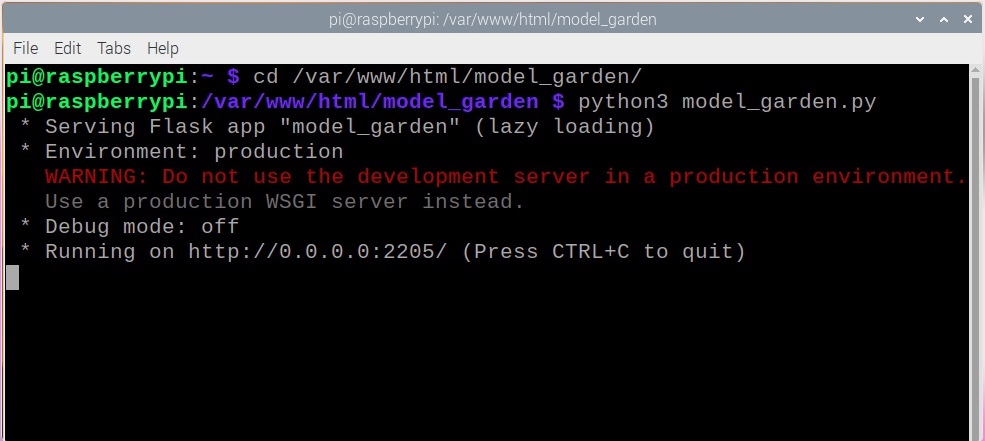
You can also run the python script from a terminal, to watch its output as it runs. Go to the project folder “/var/www/html/model_garden” and run “python3 model_garden.py”, as shown in the picture below. The web page then shows it as running, and it is stopped in the terminal with Ctrl+C.
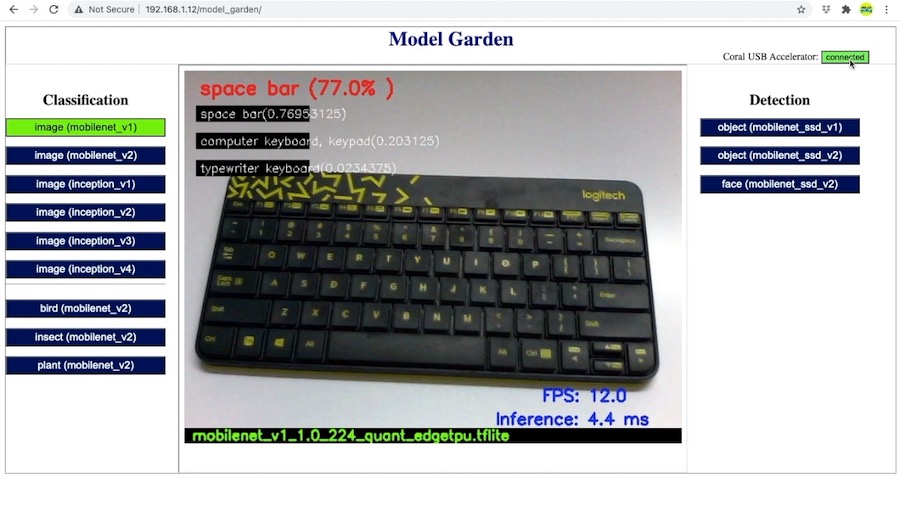
Now, by pressing the buttons on Web GUI, you can switch between the models during run time. Also, if a Coral USB Accelerator is plugged in, a button at the top right corner of the GUI loads the edgetpu version of the selected model on the Coral Accelerator; without one, the button is not shown. This way you can quickly run all the 24 Machine Learning Models on Raspberry Pi and compare their performance. Observe, how the overlays on the output image change when you switch between an Image classification and Object Detection model.
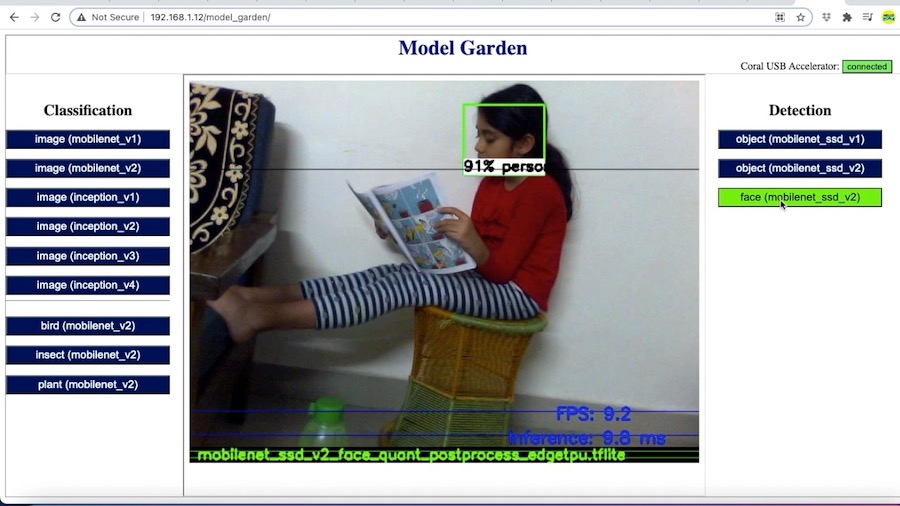
Using a face detection model we can locate a human face in a picture as shown below.
These canned models also contain few models which are specific to a particular domain. Subjects of these models include insects, birds and plants. These models can classify upto 1000 insects, 900 birds and 2100 type of plants respectively. The respective label files of these models include scientific names of these subjects. In order to test these models, I downloaded 03 random images from the internet. One from each category (as shown below).
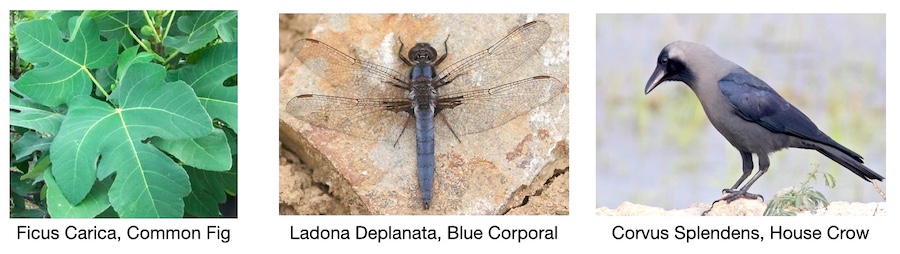
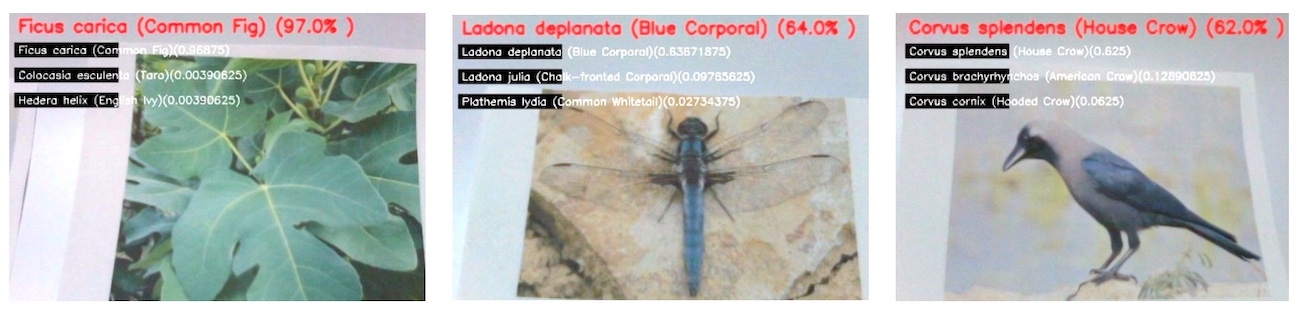
I had already checked the scientific names of these subjects while downloading their images. So during the test, I was hoping the models to show me these names. As expected, these images were correctly identified by the respective models. It was thrilling to see the models identifying them correctly. The picture shown below shows actual outputs of the respective models. The prediction with maximum confidence score is shown in red text on top of the image.
Raspberry Pi 4 Performance Graph (2021, Buster)
The results obtained from running the Machine Learning Models on Raspberry Pi 4 are as follows:-
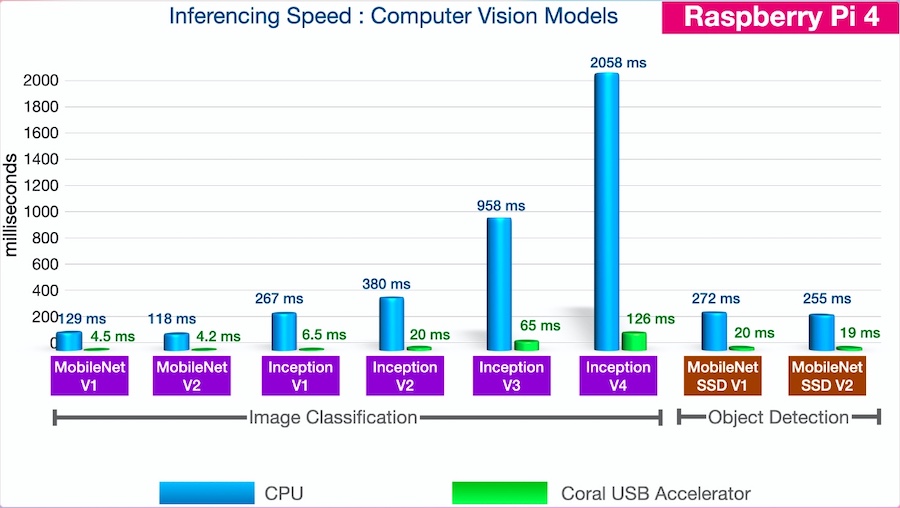
Just by scrutinising the graph above we can infer following:-
- Inferencing speeds of MobileNets are quite fast even if they run on CPU instead of Coral USB Accelerator.
- Inference time increases as we go from Mobilenet V2 to Inception V4. For the same input image, the confidence of inception V4 was found to be maximum. However, it runs 20 times slower than Mobilenet v2.
- Running Inception 4 on Coral USB Accelerator increases the speed but it still remains as fast as a MobilenetV1 without any acceleration.
- Mobilenet V1 & V2 run fastest on Coral Accelerator with inference time under 5ms.
- Object Detection Model, Mobilenet SSD V2 runs marginally faster than Mobilenet SSD V1.
Raspberry Pi 3A+ Performance Graph (2021, Buster)
The results obtained for these Machine Learning Models on Raspberry Pi 3A+ are as follows:-
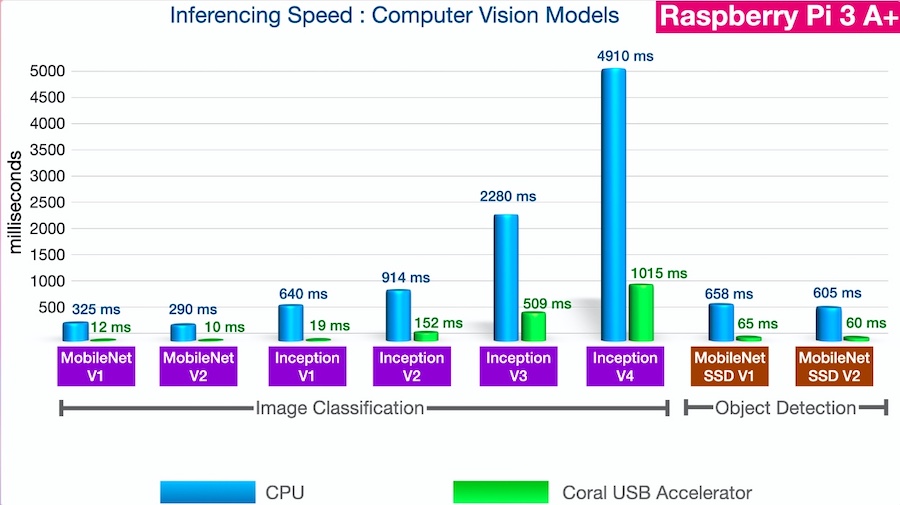
You can observe the same pattern with Raspberry Pi 3A+. However, the inference time in all the categories is much higher. This is due to its lesser computational power and RAM than Raspberry Pi 4.
Raspberry Pi 3A+ on Raspberry Pi OS Trixie (2026)
After updating the project for Raspberry Pi OS Trixie, I measured all 24 models again on a Raspberry Pi 3A+ with the Raspberry Pi camera at 640×480.
| Model | CPU inference | Coral inference |
|---|---|---|
| mobilenet_v1 | 360 ms | 10 ms |
| mobilenet_v2 | 220 ms | 12 ms |
| mobilenet_v2 bird / insect / plant | 220 ms | 12 ms |
| inception_v1 | 880 ms | 19 ms |
| inception_v2 | 1150 ms | 154 ms |
| inception_v3 | 3250 ms | 500 ms |
| inception_v4 | 7050 ms | 1020 ms |
| mobilenet_ssd_v1 (objects) | 760 ms | 42 ms |
| mobilenet_ssd_v2 (objects) | 540 ms | 48 ms |
| mobilenet_ssd_v2 (faces) | 550 ms | 26 ms |
The pattern is the same as in 2021: MobileNets are the fastest on the CPU, Inception V4 is the slowest, and the Coral Accelerator speeds every model up. The gain varies a lot: about 7 times for Inception V2 to V4, 11 to 21 times for the object detectors, and 18 to 46 times for MobileNet V1, MobileNet V2 and Inception V1.
Raspberry Pi 4 on Raspberry Pi OS Trixie (2026)
The same measurements on a Raspberry Pi 4 with a USB webcam at 640×480.
| Model | CPU inference | Coral inference |
|---|---|---|
| mobilenet_v1 | 94 ms | 4 ms |
| mobilenet_v2 | 59 ms | 5 ms |
| mobilenet_v2 bird / insect / plant | 59 ms | 5 ms |
| inception_v1 | 243 ms | 6 ms |
| inception_v2 | 313 ms | 20 ms |
| inception_v3 | 895 ms | 64 ms |
| inception_v4 | 1915 ms | 125 ms |
| mobilenet_ssd_v1 (objects) | 203 ms | 13 ms |
| mobilenet_ssd_v2 (objects) | 148 ms | 13 ms |
| mobilenet_ssd_v2 (faces) | 148 ms | 10 ms |
You can try this project on your Raspberry Pi and let me know your experience in comments below.
Pingback: Google Coral USB Accelerator performance with Raspberry Pi 3B, 3A+, 4B - Hello World
thanks for this! first example i’ve found which i could actually run in 2022 on my rpi 3b…